Category Archives: Home Security 101

Your Burns & McBride Smart, Safe Home System Can Do That!


With your Go!Control panel and alarm.com account Burns & McBride provides superior wireless security, advanced mobile and web features your old-fashioned alarm could never dream of adding, all 
at a cost in line with traditional alarm systems. And it has never been so easy to use with the new 2gig Go!Control color touch screen control panel. You will love using your system.

What it does

  • Check when the little ones get back from school, or what time your teenager came home last night.
  • Receive instant notification if a medicine cabinet, gun cabinet, liquor cabinet or other dangerous area is opened unexpectedly.
  • Add water sensors to your basement to detect a flood in time to prevent costly damage.
  • See what time the house cleaners arrived and how long they stayed.
  • Turn your thermostat back automatically every time you leave home and arm the system.
  • Unlock your door from work to let the HVAC technician repair the heater.
  • Find out if your teenager spent the afternoon playing video games in the basement or upstairs (hopefully) doing homework.

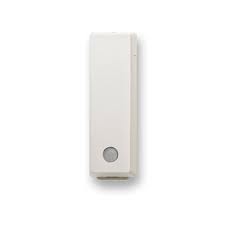
You can place an activity sensor anywhere inside your home:

  • Front/Back Door
  • Garage Door
  • Teenager’s Bedroom Window Pantry/Food Cabinet
  • Cleaning Supply Closet
  • Medicine Cabinet
  • Gun Cabinet
  • Liquor Cabinet
  • Refrigerator/Freezer
  • Home Office Door
  • Patio Door
  • Pool Gate
  • Tool Shed
  • Home Jewelry Box
  • Safe/Legal Cabinet

Leave a comment

Filed under Home Safety, Home Security, Home Security 101, Uncategorized

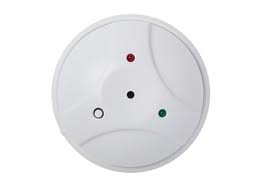
Home Security 101 – What is a Glass Break Detector?


Most people would say that home security is built around door/window sensors and motion sensors, and that’s been true – just about every system includes both of these devices. But we also find more and more customers selecting glass break sensors to enhance a system, as an effective cost-saving device when protecting a group of windows in one room. And, unlike motions sensors, glass breaks are active in both the “Stay” and “Away” modes. Since folks are increasingly arming their systems when home at night, glass breaks could be the key.

How Glass Break Technology Works

So, how does a glass break sensor work? It listens for the specific frequency that is generated by breaking glass. Glass breaks sensors are active any time your system is armed, so once you turn your system on (even in the “Stay” mode!), you need to remember that accidentally dropping a glass could trigger an alarm. These sensors have a range of 20 feet in any direction. That means one sensor can cover lots of windows in a single room, as long as there are no doors or walls blocking the “sight” of the sensor.

Where Do You Use Them?

Clustered window areas like sun rooms are a natural spot – and one sensor is great for a room with several windows and a sliding glass door, in case the intruder breaks through the glass door. Other good areas are fixed windows (some of my windows are painted shut!), and vulnerable spots where my motion sensors will not be active in the Stay alarm mode. Wireless glass break sensors mount on the wall or ceiling, and don’t have to “point” at the glass they are protecting – they just need a clear “line of sight” to do their thing. Bad guys do break glass, often to reach in and unlock a window: it’s much more efficient to use a single glass break sensor than place a door/window sensor on every window in a room.

They do have their downsides. If you drop a glass on the floor and break it, the sensor will go off since the alarm is based upon the frequency of breaking glass so be prepared for a call from the monitoring company!

Specifications
Dimensions and weight
  • Diameter: 4.55″
  • Height: 1.9″
  • Weight (including battery and bracket): 5.1 oz. (144.6 g)

Regulatory Listing(s)

  • ETL, FCC Part 15, Industry Canada
Features
  • Two test LEDs
  • Dual shatter recognition technology
  • Five-year lithium battery
  • 360° range
  • Tamper protected
  • Fully supervised
Benefits
  • Dual-shatter recognition technology: Reduces false alarms by monitoring for both stages of breaking glass—the initial blow and the shatter
  • Reduces costs: Lowers up-front installation costs by providing one device in rooms with multiple windows
  • Maximum detection coverage: Features a 360° horizontal sensing angle that provides maximum detection coverage, no matter where you put it
  • Tamper–proof: Know when someone is trying to tamper with your alarm
  • Fully monitored: Get connected to the Vivint central monitoring station in as few as 17 seconds
Radio
  • Wireless signal range
  • 300 ft., open air, with 2GIG Wireless Alarm Control Panel
  • Transmitter Frequency
  • 345.000 MHz (crystal controlled)
  • Transmitter Frequency Tolerance
  • ± 15 kHz
  • Transmitter Bandwidth
  • 24 kHz
  • Modulation Type
  • Amplitude Shift Keying—On/Off Keying (ASK-OOK)
  • Peak Field Strength
  • Typical 50,000 uV/m at 3m
Housing
  • Material
  • ABS plastic
  • Color
  • White
  • Operating temperature
  • 32° to 120°F (0° to 49°C)
  • Relative Humidity
  • 5-95% Non-Condensing
  • Unique ID Codes
  • Over one (1) million different code combinations
  • Supervisory Interval
  • 70 minutes
Warranty
  • Lifetime
Included equipment and accessories
  • Battery (installed)
  • Two (2) Panasonic CR123A, or equivalent Lithium batteries
  • Included Accessories
  • (3) Phillip’s head screws, three (3) plastic wall anchors

For more information on this exciting product call us at 302-656-5110 or visit our website at http://www.burnsandmcbride. Finally you might want to follow our blog at http://www.burnsandmcbrideblog.com. Just as Smartphones are adding applications and changing every day so to with the technology behind our Smart, Safe home system. Our blog explains some of the constantly changing things that are happening in the industry and we hope that you find it informative.


Leave a comment

Filed under Home Safety, Home Security, Home Security 101, Uncategorized

Home Security 101 – Designing Your System


How do you design the right system to begin with? There are plenty of options out there, and it can be confusing. There’s really no mystery to good alarm system design – and with today’s technology, a little basic information and some common sense is all you need.

What you Need to Know – the Top Ten

  1. Wireless cellular monitoring. Cellular monitoring is the core of every safe and reliable alarm system. With features such as “Smash and Grab” protection it provides you with the finest in protection.
  2. Wireless sensors. They work, and they are the easiest (and most convenient) way to protect your home or business. You can add to your system at any time, move them or even move the entire system. Plus, they allow pre-programmed systems to be self-installed, which will eventually be the norm.
  3. Start with your exterior doors. Almost 60% of burglaries happen through the front or back door, and when you add in the garage, the total is two thirds of every forced entry. Clearly this is the place to start your design – and don’t forget your basement, or that door from the garage into your house. Having good locks (and using them!) should go without saying.
  4. Windows – basement and first floor. First floor windows are next in line behind the front door as points of illegal entry: 23% of burglaries happen through a first floor window. What’s even scarier is how many of these windows are not even locked! Start with sensors at the back and side windows of your house first, as they are generally the most vulnerable, with less illumination and less visibility from the street. Think about the windows you consider the most easily accessible and the most hidden – that’s how the bad guys think!
  5. Decide how you are using the system. Here’s where we need to remember the “Stay” and “Away” modes on your system. The Burns & McBride Smart, Safe Home system allows both ways to arm the system, and the way you are going to use the system will determine not only which mode to use, but also which sensors you select
  6. Work up from the basement. If you don’t have a basement, then it’s simple. But if you do, remember that those doors and windows are also vulnerable. Finished basements may be treated just like the first floor, while unfinished basements may allow a simpler solution – like a motion sensor. When you get to the second floor, you can usually relax – the incidence of entry above the ground floor is extremely low, unless there is a low roof, or stairway that provides easy access.
  7. Think about your pets. Pets are an important alarm system design consideration. Your large dog with the run of the house during the day probably means that you won’t arm your motion sensors, so you may need more window sensors or glass break sensors. Also, pets are a really good reason to make sure you have monitored smoke/heat sensors. My dogs are clever, but they do not dial 911 very well!
  8. Speaking of fire monitoring… we strongly recommend at least one monitored smoke/heat sensor with every system. They cost about $100, and what’s more important – there is be no additional monthly charge for fire monitoring. Also, be sure to get the maximum discount from your insurance company for a monitored system – even more savings with fire monitoring.
  9. Environmental sensors. We just wrote about the nasty lesson a friend learned from the flood in their office – so make sure you add those sensors for carbon monoxide, water/flood, and low temperature. Again, there is be no additional monthly charge for adding these.
  10. Thermostat – Our Smart Thermostat helps to pay for your monthly monitoring fee with energy savings. This is a very important part of any interactive home management system.

All of these design components will  work best when you have a system with interactive monitoring capabilities. With interactive features, you not only have the confidence that comes with professional monitoring, but also the added benefits of remote arming, text and email notifications from your system, and even special free apps for your iPhone, BlackBerry, or Droid device. Burns & McBride Home Comfort, a  leader in interactive, wireless security systems, specializes in these interactive services.

For more information on this exciting product call us at 302-656-5110 or visit our website at http://www.burnsandmcbride. Finally you might want to follow our blog at http://www.burnsandmcbrideblog.com. Just as Smartphones are adding applications and changing every day so to with the technology behind our Smart, Safe home system. Our blog explains some of the constantly changing things that are happening in the industry and we hope that you find it informative.
Leave a comment

Filed under Energy Management, Home Safety, Home Security, Home Security 101, Uncategorized

Home Security 101 – What is a “Home Disaster” Monitor?


What would happen if you were away from home and the heater stopped working or the water heater sprung a leak?

How a Freeze Sensor Works

When the inside temperature hits 41, well before your pipes freeze, the sensor triggers sends a message to your Burns & McBride Go!Control. A message is immediately sent to the monitoring center. If you are using Burns & McBride Home Comfort’s interactive monitoring (as most Burns & McBride Home Comfort customers do), then you’ll also be notified by text or email right away.  Once the temperature climbs back to 50 degrees Fahrenheit, the sensor resets itself.

How a Water Sensor Works

When water from something like a leaking water heater, broken washing machine hose or flooded basement touches the sensor, a message is sent to your Burns & McBride Go!Control and help is on the way.

Our Home Disaster monitor can do both of these things. It combines a sensor which looks for water with a small “thermostat” which is always on guard for falling temperatures. If either of these problems occurs it sends an immediate alarm signal to your Burns & McBride Go!Control panel and the central station is notified to call the people you have designated.

It Gets Even Better

We can even install a special Z-Wave enabled motorized valve which will automatically shut off the water in your home if either of these alarms goes off.  See our posting on “Water, Water Everywhere” for more information

Wireless environmental sensors are available today and using them to protect your primary or vacation home does not add a penny to your monthly cost.

And one more thing …there is NO additional monthly charge for this. We can install the Home Disaster monitor on your system for a nominal fee and there is NO change in your monthly monitoring fee.

For more information on this exciting product call us at 302-656-5110 or visit our website at http://www.burnsandmcbride. Finally you might want to follow our blog at http://www.burnsandmcbrideblog.com. Just as Smartphones are adding applications and changing every day so to with the technology behind our Smart, Safe home system. Our blog explains some of the constantly changing things that are happening in the industry and we hope that you find it informative.

Leave a comment

Filed under Home Safety, Home Security, Home Security 101, Uncategorized