
Z-Wave Wireless Home Control Module Goes Incognito


To connect lamps and appliances to your Z-Wave network, you used to plug a module into your power receptacle and then plug your lamp/appliance into the module. Now, Z-Wave has an in-wall receptacle, making it unobtrusive.

z-wave receptacle

Wireless Control In-Wall Split Receptacle

The Evolve Wall Receptacle replaces standard wall receptacles. The receptacle contains one Z-Wave AC outlet and one standard AC outlet. An LED shows feedback that the controlled device is working.

The duplex receptacle enables wireless control of on/off functions for standard incandescent table and floor lamps, fluorescent table and floor lamps, and small appliances. It replaces your current electrical outlet, uses your existing wiring, and provides a Z-Wave enabled outlet for the lamp/appliance that you would like to control and a regular pass-through AC outlet for other electrical devices.

The receptacle requires in-wall installation with hard-wired connections.

Any device displaying the Z-Wave logo can be incorporated in your Z-Wave network. Since Z-Wave operates on RF frequencies and every device is a repeater, the more devices you use, the better your network functions.

About Burns & McBride

The Burns & McBride Smart, Safe Home system uses Z-wave technology to tie things like locks, thermostats and lights together so that you can control them whether you are home or away. Burns & McBride has been providing essential home services since 1949. To learn more about Burns & McBride’s Smart, Safe Home can help you – callus at 302-656-5110 or visit our website at www.burnsandmcbride.com

Leave a comment

Filed under Energy Management, How Things Work, Installing and Mainaining, Uncategorized

What the Heck is “Z-Wave”?


Z-Wave lets you build your home control system as your needs grow.

Z-Wave Video

Start with one module

As just one example, let’s say you started by adding Z-Wave remote control to your home lights. You can easily program them to shut off when you’re at work, and turn back on to welcome you when you return home, saving energy and money.

Add more modules as needed

You could then introduce more functions to this basic setup. Just add Z-Wave to your garage door, your home entry, and your home security system. When you arrive from work, push a button and all your Z-Wave devices will work in concert — the garage door will open, your entryways will light up, your security system will recognize you, and your front door will unlock. How’s that for remote control?

Easily build to a complete home control system

Once you’re inside, your home can welcome you with just the mood you want. Z-Wave can have your favorite music playing for you on arrival, and the thermostat set to your preferred temperature. While you were away, Z-Wave made sure the lawn sprinkler watered your lawn on schedule. If it had rained, you could have bypassed the sprinkler from work, from a PC or even a cell phone. When you’re ready to call it a night, a single button could turn off your house lights, activate your security system, turn down the thermostat, lock the doors, turn on the bedroom humidifier, and set up the coffee pot to greet you with a fresh cup when you awake.

All with one button. All added easily and inexpensively to your home. All with no new wiring. And all according to your budget and timetables, to meet your needs and your lifestyle. Z-Wave gives you simple, affordable, personalized control solutions.

About Burns & McBride

The Burns & McBride Smart, Safe Home system uses Z-wave technology to tie things like locks, thermostats and lights together so that you can control them whether you are home or away. Burns & McBride has been providing essential home services since 1949. To learn more about Burns & McBride’s Smart, Safe Home can help you – callus at 302-656-5110 or visit our website at www.burnsandmcbride.com
Leave a comment

Filed under Energy Management, How Things Work, Uncategorized

How to install a Kwikset Z-Wave Lock


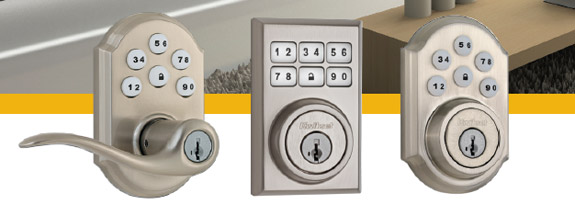
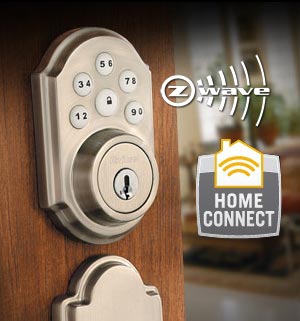
Kwikset electro-mechanical locks feature wireless connectivity using Z-Wave. Z-Wave enables the door lock to wirelessly communicate with other devices in the home such as 2GIG’s Go!Control Wireless Alarm.

Installation

Z-Wave locks are LOW POWER devices and must be learned in within 12 inches of the Z-wave controller so that all encrypted data is passed between the lock and the controller. This will insure that the lock is successfully registered.  The inclusion or ADD process should be performed as follows:

  1. Install the keypad portion on the exterior of the door and pass the wiring harness through the deadbolt or lever set hole in the door on the UNDERSIDE of the latch
  2. Place the wire through the appropriate hole in the back-plate per the included installation instructions
  3. Mount the steel back-plate to the interior section of the door and install the two bolts that will sandwich the keypad and back-plate to the door
  4. BEFORE plugging in the wiring harness, take the INTERIOR SECTION of the lock that houses the Z-wave card and the battery pack over to the installed Z-wave controller for local programming
  5. Install the battery pack and wait 10 seconds for the beeps to complete
  6. Place the controller into “ADD DEVICE” mode
  7. Hold the interior section of the lock within 12 inches of the controller
  8. Press the top left little white button on the rear of the lock for 1 second and the red light on the Z-wave card should illuminate through the paper labeling
  9. Once the lock is successfully added and shows up on the controllers display, KEEP THE LOCK WITHIN 12 INCHES of the controller for 60 seconds. This will allow for all of the locks data and encryption information to be successfully passed to the controller.
  10. After 60 seconds, install the INTERIOR SECTION of the lock by attaching the wiring harness and installing the two screws that secure it to the back-plate
  11. Perform a test of the lock by attempting to lock and unlock the lock via the controller or via alarm.com to confirm successful communication

Please keep in mind that Z-wave is a “Wireless mesh network” and that all Z-wave devices only have a typical range of 30 feet or less depending upon the homes construction and communication path.  It may be necessary for the installer to install a repeatable or beaming Z-wave device (lamp module) to assist in the communications path with the controller.  The more Z-wave devices installed in a home, the more robust the Z-wave network. This is true for locks, lights and thermostats and is not lock only specific.

Troubleshooting

The above process will prevent communication failures between the lock and the controller or erratic operation caused by the installation of a lock that hasn’t been fully programmed and completely recognized by the controller.

On occasion, a lock may fail to operate as designed or programmed because the data transmission during inclusion or “ADD DEVICE” was not 100% successful and the lock may be operating with a controller that does not completely recognize the data being transmitted by the lock.

Utilizing this information, as well as the previous technical bulletin, should help to eliminate most if not all Z-wave lock related issues that an installer may experience when in the field.

Should an installer have the issue described above and experience poor response, erratic operation or no operation, remove the interior section of the lock and take it over to the Z-wave controller.  Initiate a “REMOVE DEVICE” and then initiate an “ADD DEVICE” to reinstall the lock as outlined above to ensure proper and complete communication between the controller and the lock.

Home Connect Information from Kwikset

Available Kwikset Locks

Kwikset Locks Brochure

New Kwikset Locks Contemporary Brochure

Leave a comment

Filed under Installing and Mainaining

Use affordable video to check on your home


The Burns & McBride Smart Safe Home system uses affordable, cutting edge technology from

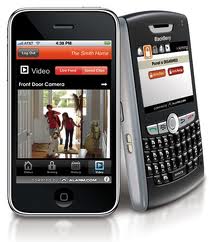
System alerts and notifications offer great advances in home and business monitoring, but wouldn’t it be amazing if you could actually see what’s happening at home while you’re away? Burns & McBride Video allows you to do just that. It even offers options for outdoor and night-vision cameras to monitor what goes on in your yard or driveway.

Live Video

View real-time video of your home from one or more of your cameras. You can watch each angle one at a time, or take advantage of the Multi Camera View to see all camera views on a single screen.

Saved Video Clips

Easily set up your cameras to record video clips whenever motion is detected or during scheduled times. Then view, tag and search your clips to retrieve them later.

Video Alerts to Your Phone

Using any compatible cell phone or web-connected mobile device, you can access saved video clips and even view live feeds.* Recorded video clips can also be sent to your mobile device along with system alerts and notifications.

How it Works

Burns & McBride Home Comfort can offer you a variety of security-grade IP video cameras as part of our Smart, Safe home system Each camera includes built-in Wi-Fi or Ethernet connectivity and requires only a high-speed Internet connection and a power outlet — no need to plug it into your computer or install any software. The videos are stored remotely on our servers at Alarm.com, which means that you’ll be able to view both live and recorded clips anytime on the web — or even on your cell phone or smartphone.

You can even move the camera around your home to meet different needs. Maybe you would like it to watch the back door or then again you might want to look in on one of the children’s rooms. You be the judge.

* Note: Functionality varies depending on your Alarm.com service plan.

About Burns & McBride

Burns & McBride Home Comfort was founded in 1949 and is committed to providing dependable home comfort and safety services to homeowners throughout the Delaware alley. In addition to home security sales through its unique Smart, Safe Home system, it also provides homeowners with HVAC services, heating oil delivery and waste and recycling services. For more information on Burns & McBride please call us at 302-656-5110 or visit our website at www.burnsandmcbride.com
Leave a comment

Filed under Uncategorized